
Download Episode Downloader – Free TV Show & Movie Downloader for Windows, Mac, Android, iOS
Looking for a reliable way to download TV episodes and movies without paying? Episode Downloader is a powerful multimedia tool designed to help users search, stream, and download video content from across the web. Whether you're on Windows, Mac, Android, or iOS, this software offers a centralized platform to find and save your favorite shows. While the free version provides basic search and download capabilities, advanced features like live stream recording and media conversion are only unlocked in the paid version. Despite some limitations in content quality and legality, Episode Downloader remains a popular choice for fans seeking convenient access to episodic content.
Key Features of Episode Downloader
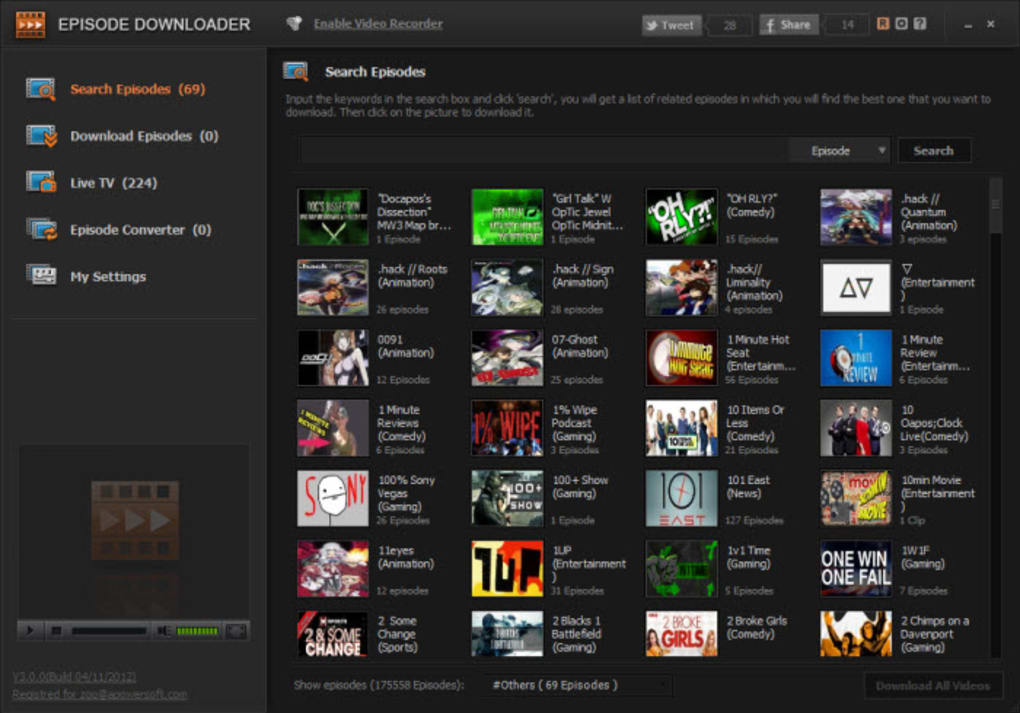
Episode Downloader is packed with tools that make media management easier than ever. One of its standout features is the universal search engine, which scans multiple websites simultaneously to find TV episodes and movie clips. Whether you're searching for a classic series or the latest season premiere, the app delivers results in seconds. The interface is intuitive, allowing even beginners to navigate with ease.
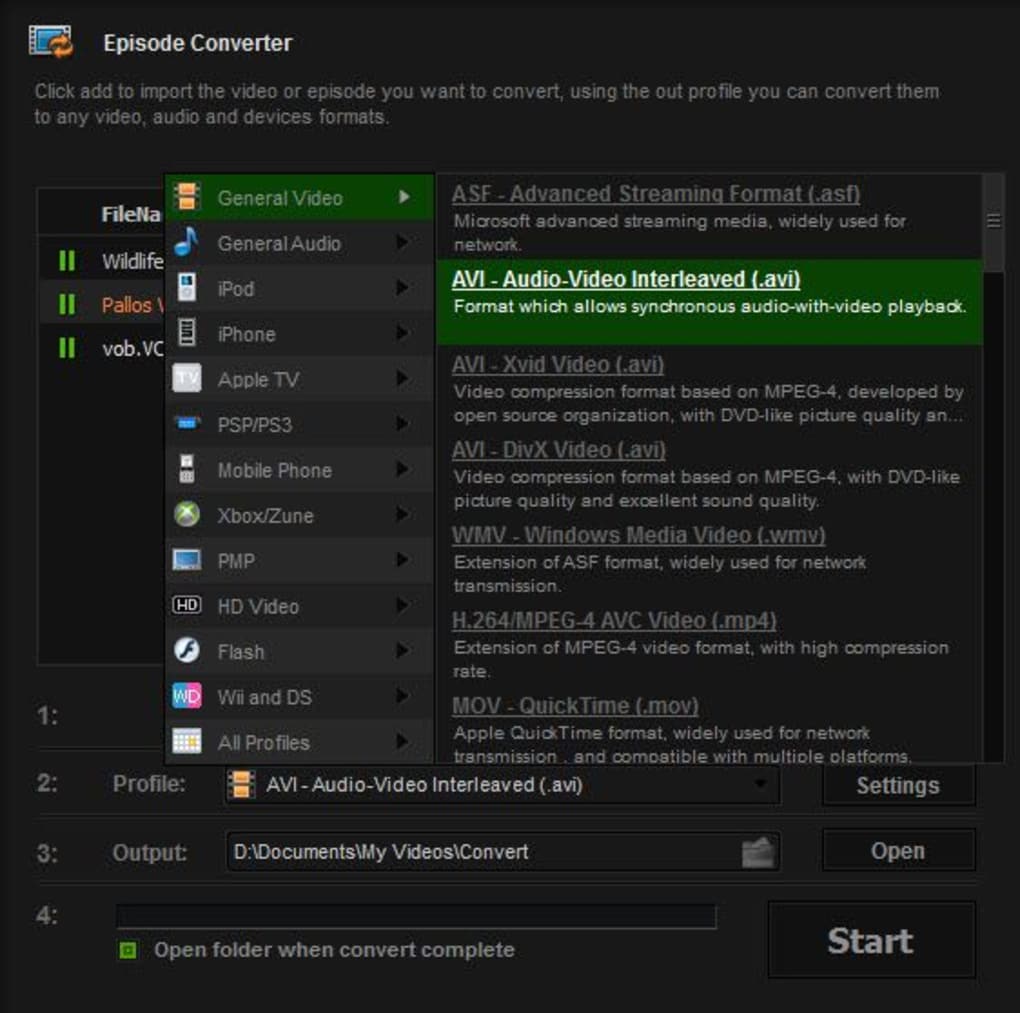
Another major highlight is the built-in media converter. Many users struggle with videos that don’t play on their devices due to incompatible formats. Episode Downloader solves this by converting files to MP4, AVI, MKV, and other widely supported formats. This ensures your downloaded content works seamlessly on smartphones, tablets, smart TVs, and gaming consoles.
The live stream recording function is particularly impressive—available only in the premium version. It monitors your browser while you stream content on platforms like Hulu, Netflix, or Amazon Prime and automatically captures the video in real time. This feature is ideal for users who want to save episodes they’ve already started watching, especially when they’re traveling or lack a stable internet connection.
Additionally, the app includes basic editing tools such as trimming, cropping, and adjusting brightness. These allow you to customize your downloaded videos before sharing or archiving them. The software also supports batch downloads, so you can save multiple episodes at once without manual intervention.
How to Install and Use Episode Downloader
Getting started with Episode Downloader is straightforward, regardless of your device. For Windows and Mac users, visit the official website and download the installer. The setup wizard guides you through the process with clear on-screen instructions. Once installed, launch the app and grant necessary permissions for file access and internet connectivity.
To begin searching, simply enter the name of your desired show or movie in the search bar. The software will scan hundreds of online sources, including fan-uploaded clips and public video repositories. Results are displayed with thumbnails, source links, and estimated video quality. Click on any entry to preview the clip before downloading.
For Android and iOS users, download the mobile version from the Google Play Store or Apple App Store. The mobile interface is optimized for touch, making it easy to browse, search, and manage your library on the go. You can also sync your downloads across devices using a cloud account.
Once you’ve selected a video, choose your preferred output format and destination folder. The app supports customizable download settings, including resolution and file naming conventions. After initiating the download, you can monitor progress in the download manager. For advanced users, the software offers scheduling options, so downloads can run automatically during off-peak hours.
Compatibility and System Requirements
Episode Downloader is designed to work across a wide range of platforms, ensuring broad accessibility. It supports Windows 7 and later, including Windows 10 and Windows 11, with both 32-bit and 64-bit versions available. Mac users can install it on macOS 10.14 (Mojave) and newer, including Apple Silicon (M1/M2) Macs.
For mobile users, the app is compatible with Android 6.0 (Marshmallow) and above, as well as iOS 12 and later. This ensures that even older smartphones and tablets can run the software smoothly. The app is lightweight, requiring only 200MB of free storage and minimal RAM usage, making it ideal for low-end devices.
Internet connectivity is essential for searching and downloading content. A stable connection is recommended for high-quality downloads, especially when using the live stream recording feature. The software also integrates with popular web browsers like Chrome, Firefox, and Edge, enhancing its ability to detect streaming sources.
Pros and Cons of Episode Downloader
- Pros:
- Free to download and use with basic features
- Supports multiple platforms: Windows, Mac, Android, iOS
- Powerful search engine finds episodes from various sources
- Media converter supports common video formats
- Live stream recording (premium feature)
- Batch download and scheduling options
- Lightweight and low system resource usage
- Cons:
- Most results are low-quality or fan-made content
- HD and official episodes are rarely available
- Live stream recording requires a paid subscription
- Some sources may host pirated or illegal content
- Interface can feel cluttered with too many options
- Occasional download failures due to website restrictions
Frequently Asked Questions (FAQ)
-
Is Episode Downloader safe to download and use?
Yes, the official version of Episode Downloader is safe when downloaded from the verified website. However, always avoid third-party sources, which may bundle malware. The app uses secure protocols for downloads and does not collect personal data.
-
Can I download HD episodes with Episode Downloader?
While the app can find high-resolution videos, most results are from unofficial sources and often suffer from poor encoding. HD content is rare, and even when found, quality may not match official releases. The paid version improves success rates but doesn’t guarantee HD.
-
Does Episode Downloader work on Android and iOS?
Yes, Episode Downloader offers native apps for both Android and iOS. These versions support searching, downloading, and basic editing, though advanced features like live recording are only available in the paid desktop version.
-
Is Episode Downloader free to use?
Yes, the core features are free to download and use. However, premium features such as live stream recording, faster downloads, and ad-free browsing require a paid subscription.
-
Can I convert downloaded videos to other formats?
Absolutely. Episode Downloader includes a built-in media converter that supports over 20 video formats. You can convert files to MP4, AVI, MKV, MOV, and more, making them compatible with any device.
Final Verdict and Call to Action
Episode Downloader is a versatile, user-friendly tool for anyone looking to download and manage TV episodes and movies. While it falls short in delivering high-quality, official content, its robust search engine, media conversion, and cross-platform support make it a solid choice for casual viewers. The free version offers enough functionality to get started, but power users will benefit from upgrading to the premium plan.
If you're tired of paying for subscriptions or dealing with buffering issues, try Episode Downloader today. Download it now and start building your personal video library—secure, fast, and completely customizable. Whether you're on Windows, Mac, Android, or iOS, this software puts your favorite shows at your fingertips.
Download Episode Downloader today and enjoy uninterrupted access to your favorite content—free and easy!







